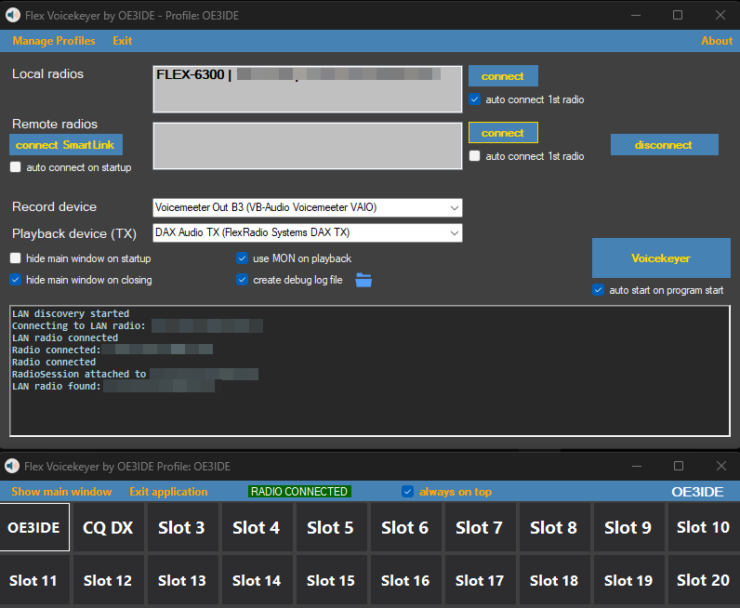
As I couldn’t find a suitable voice keyer for SmartSDR on Windows, I decided to develop my own.
Features
-
works with local radios (LAN discovery) as well as via SmartLink
-
option to auto connect to first radio
-
20 slots for recording (right click on slot for context menu)
-
Auto MON on playback
-
Using DAX (Device: FlexRadio Systems DAX TX) to send audio (DAX will be auto-enabled/disabled during playback)
-
runs on Win 10/11 64bit
Caching is disabled for this site. However, some browsers ignore this. Please refresh with Ctrl + F5 so that the latest content is loaded.
The software is 100% free of charge, no trialperiod or whatsoever. If you like it, a donation will be much appreciated!
Have fun with it
Ernst, OE3IDE
Download:
Flex Voicekeyer by OE3IDE 1.0.4
13 Downloads
Release Notes:
Version 1.0.4
-
added: local per-slot hotkeys alongside global hotkeys in the same dialog, with per-profile persistence and conflict detection
-
added: focus-aware slot hotkey captions with English key names and tooltips showing both assignments
-
added: per-slot auto-repeat with configurable total play count and pause, available through the repeat icon or Play repeat context menu
-
added: dark pause state with a shrinking countdown bar between auto-repeat transmissions
-
added: stop auto-repeat when operator PTT/MOX activates during a pause without releasing the operator’s transmission
-
changed: clicking any slot or repeat icon stops active playback or auto-repeat, including pauses
-
changed: repeat icon gray when unconfigured, blue when ready and green while the sequence is running
-
added: optional per-slot peak normalization to -3 dBFS for PC/TX playback, capped at +12 dB gain; source WAV remains unchanged
-
added: independent SmartLink connect/disconnect toggle; disconnecting a remote radio keeps SmartLink connected
-
changed: matching LAN/WAN connect-disconnect buttons with visible connection indicators
-
changed: uniformly hide slot headers in compact windows and reserve header space in larger windows
-
fixed: use a single padding-aware font calculation to prevent short slot titles from wrapping
-
fixed: asynchronous transport disconnect and non-blocking UI logging prevent disconnect deadlocks; ignore duplicate connection events
-
fixed: require an active GUI station with a TX slice before playback; stop on station loss and guard against stalled audio playback
-
fixed: wait for receive confirmation between repeat cycles to avoid interpreting delayed own TX updates as operator PTT
Version 1.0.3
-
Added global per-slot hotkeys that work even when the Voicekeyer window is not focused. Pressing the same hotkey again stops playback.
-
Added hotkey assignment through the slot context menu, including conflict detection and per-profile settings.
-
Added WAV import through the slot context menu, including a title prompt. Imported audio is saved as
slot1.wav,slot2.wav, etc. -
Added dark mode to the hotkey and slot rename dialogs.
-
Added icons for hotkey assignment and audio import.
-
Sorted audio device lists alphabetically.
-
Changed TX device selection to take effect on the next playback without restarting the application.
-
Added visible error messages for unavailable TX devices and playback failures.
-
Fixed WAV import validation for mono and stereo files.
Version 1.0.2
-
small bug fixes
-
changed checkboxes to toggle switches
Version 1.0.1
-
added: option to keep MON and DAX active after playback
Version 1.0.0
-
initial release
Greetings friend, it would be interesting if this software worked with Hermes Lite, since Thetis is very good but they forgot to make a good voice keyer. Thanks, 73 from Felix EA4HOS
Hi, no it does not work with Thetis. But one of next releases of Thetis should include a very sophisticated voicekeyer.
73 Ernst
Nice work! Works flawlessly on a FlexRadio SmartSDR for remote ops.
Nice work! Works flawlessly on a FlexRadio SmartSDR for remote ops. Would be perfect if you could use the keyboard function keys to trigger the voicekeyer.
ON4FF, Filip